I mentioned in the last post that I hoped my Garmin Forerunner 205 problems on Saturday were a one-time thing. Well, no such luck. It went from bad to worse for my Sunday run.
As the watch had occasionally been turning off as I put it on my wrist, I decided to do it slowly and carefully, and watch everything as it happened. I learned something -- I saw a slight gap form between the face and the back of the watch. Sure enough, it turned off. Hoping that it had just "un-snapped," I pressed it gently together, hoping to hear a tiny click as it snapped back together. I heard nothing. But when I turned it back on, it behaved normally.
About two or three minutes into my run, disaster struck. The entire face of the watch simply fell off and landed on the ground! I was just running along as I always do. I didn't bump into anything, or even move my arm or wrist in any unusual way.
I could see immediately why it had been turning off. The watch band has the battery and little else; the face contains the electronics, the antenna, and the display. The battery isn't wired to the rest of it. It has contacts on either half that are normally held together by the case.
I was still near home, so I just ran back, left the watch, and headed back out.
After completing my run, I held the watch together and turned it on, and it seemed to be working normally. I turned it off and pulled it apart, though "pulled" is a strong word here -- it pretty much just comes apart now. It looks to me like it's normally just held together by some sort of adhesive that has failed.
I inspected it, trying to determine the best way to fix it. I gently took it apart and put it back together a few times, checking the fit and wondering what kind of glue I might use. Each time I turned it on & off to see if everything still functioned. About the third time, the display showed a seemingly random pattern instead of the usual display, and since then, the display doesn't show anything at all any more.
It still beeps as I turn it on and hit the other buttons, and stops beeping if I turn it off, so it looks as if it's just the display that's not working. I can't see anything obvious that's wrong, like a loose contact.
It's out of warranty, but I see Garmin has a repair program. I'll try contacting them to see if my watch qualifies, and how much it would cost.
I still have my Forerunner 201, but it has issues of its own, which I'll describe some time. I really, really want my 205 to work.
I did some searching, and I found somebody who has taken a 205 apart. Mine looks just the same, except the battery is a different color. If Garmin's repair program can't do anything for me, I imagine I'll be revisiting those pictures in order to attempt my own repair.
Showing posts with label gps. Show all posts
Showing posts with label gps. Show all posts
Tuesday, April 13, 2010

Saturday, April 10, 2010
Forerunner follies
What a beautiful morning for a run! It was sunny with a light breeze, and about 50 degrees. Absolutely perfect.
Less than perfect was the performance of my Garmin Forerunner 205. I turned it on and put it out on the porch so it could acquire satellite signal while I put on my running gear. Minutes later, I put on the watch, and it immediately turned off. It had done this once or twice before. I turned it on, and it quickly acquired signal again, and turned off again. One more time seemed to do the trick, so I started on my run.
Less than a minute into my run, the watch beeped. I looked at it, and it had taken a 1 km split. Several seconds later, it took another 1 km split. I was setting world records like crazy! My mile time was well under a minute.
It eventually settled down for a while, and recorded some splits that look pretty reasonable. About 17 minutes into the run, though, it went a little crazy again, and took some weird splits again. My 10K split was about 19 minutes -- another world record drops!
Eventually it shut off altogether. I turned it back on, and it stayed on the rest of the way home. My reported average pace was 2:42/km, or 4:20/mi. I wish!
I hope this is a one-time anomaly. I really rely on that watch in long runs to help me keep a steady pace.
Less than perfect was the performance of my Garmin Forerunner 205. I turned it on and put it out on the porch so it could acquire satellite signal while I put on my running gear. Minutes later, I put on the watch, and it immediately turned off. It had done this once or twice before. I turned it on, and it quickly acquired signal again, and turned off again. One more time seemed to do the trick, so I started on my run.
Less than a minute into my run, the watch beeped. I looked at it, and it had taken a 1 km split. Several seconds later, it took another 1 km split. I was setting world records like crazy! My mile time was well under a minute.
It eventually settled down for a while, and recorded some splits that look pretty reasonable. About 17 minutes into the run, though, it went a little crazy again, and took some weird splits again. My 10K split was about 19 minutes -- another world record drops!
Eventually it shut off altogether. I turned it back on, and it stayed on the rest of the way home. My reported average pace was 2:42/km, or 4:20/mi. I wish!
I hope this is a one-time anomaly. I really rely on that watch in long runs to help me keep a steady pace.
Wednesday, March 31, 2010
Garmin Forerunner GPS watches
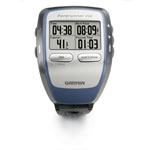
I really enjoy these devices. Before I had them, I'd find myself running the same few routes over and over again. I like to know how far I've run, and if I just ran some random route, I'd have no convenient way of knowing the distance. There are ways; one of my favorites is the USATF Running Routes web site. This lets you plot your route on a map, and calculates your distance.
Now I can just put on the watch and go where the road takes me, and no matter where I run, it'll keep track. It really changed the way I run.
It comes with some software called Garmin Training Center, which I had always found to be a bit of a disappointment. The mapping function was really rudimentary, especially considering it was a Garmin product. They're a GPS company known for mapping, and the maps it would draw for local runs were laughably crude. It would only show three roads in the entire town, and then a line showing my run in relation to those roads.
I rarely run outside in the winter, so I haven't been using the watch lately. Thus, I also haven't been checking for new versions of Training Center. I'm happy to report that Garmin has improved the application. I've spent only a few minutes looking it over so far, but I can already tell they've put in some good work.
It was much harder than it should be to actually get the new version. The link to the current version on Garmin's web site is broken, and they don't link to prior versions. I took a few guesses on the web address where I might find an older version, and found v3.01. I downloaded and installed that, then used its built-in update feature to get 3.04. Not cool, Garmin!
Anyway, the mapping feature in v3 isn't all that much better, but there's an option to view any saved route on Google Earth. That's a lot of fun.
However, a locally-installed software application isn't my preference. I'd rather have this stuff live on the Internet, and, sure enough, Garmin has a solution for that as well. There's a web site called Garmin Connect that lets you upload your data from your watch. You do have to have a browser plugin installed locally for the actual upload, but the data is stored "in the cloud" and I can view it anywhere. I can also upload from either my desktop or laptop computer and have the data all go to the same place. Nice.
There's also a way to import the data into dailymile, a sort of Facebook-meets-running-log, which I've only just started to explore. I may have more to say about that later.
This stuff makes my running life a little easier, and a lot more fun. I'm a computer nerd as well as a runner, so you can imagine that I really love these electronic running gizmos.
Subscribe to:
Posts (Atom)